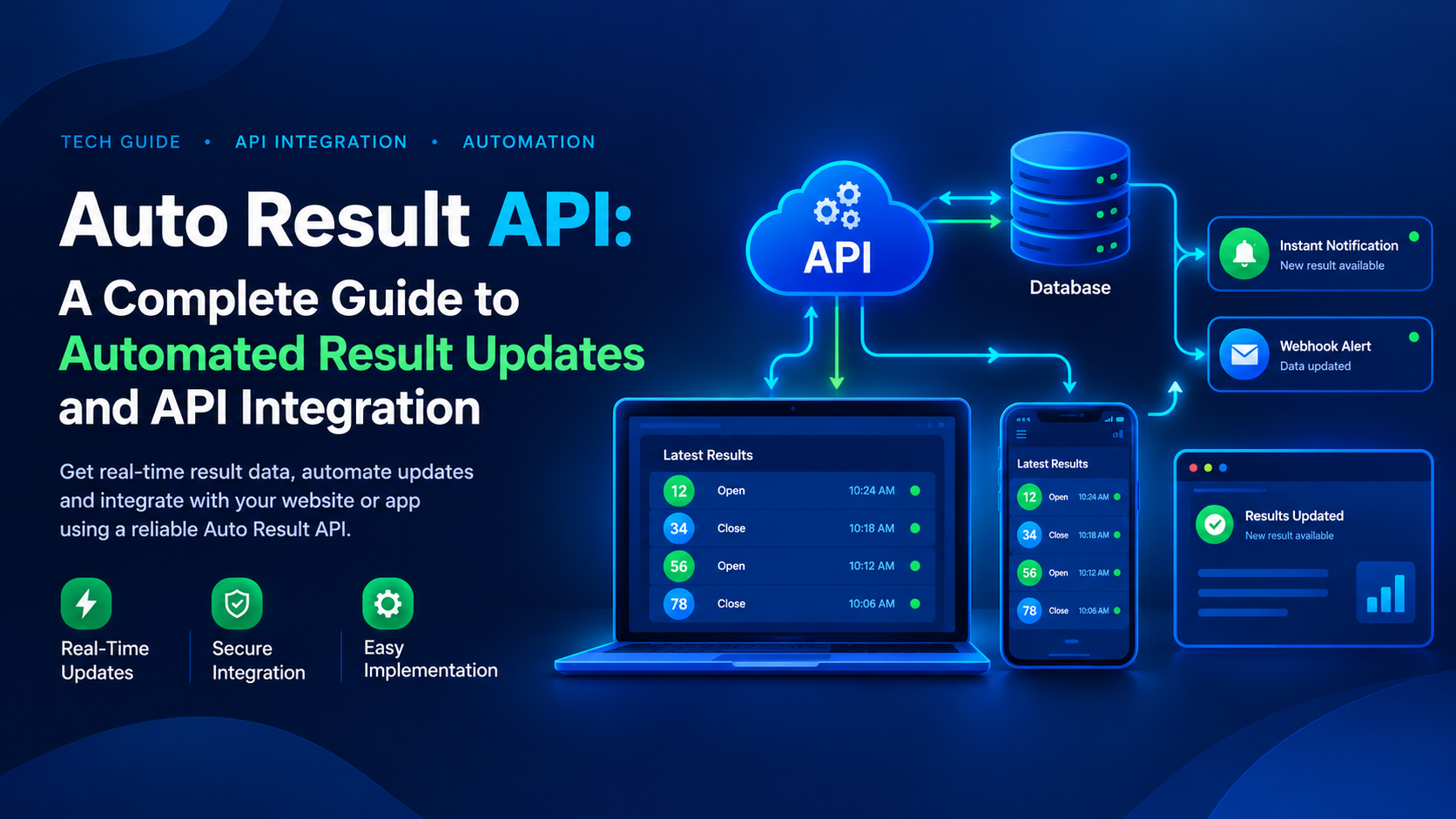
Auto Result API: A Complete Guide to Automated Result Updates and API Integration
In today's digital world, automated data delivery has become an important part of modern applications. Businesses and developers need reliable systems that can retrieve updated information, process it efficiently, and display it to users without unnecessary manual work. This is where an Auto Result API can play an important role.
An Auto Result API is designed to automate the process of retrieving and delivering result-related data to compatible websites, applications, and software platforms. Instead of manually collecting information and updating a website every time new data becomes available, developers can integrate an API to make the process more efficient.
For businesses exploring automated result data solutions, understanding how an Auto Result API works, how webhooks help, and what to check before selecting a provider can make the integration process much easier.
What Is an Auto Result API?
An Auto Result API is an application programming interface that allows software to retrieve result-related information automatically from a supported data source. It creates a connection between a data provider and an application, helping developers display available information through their own software.
In a traditional workflow, someone may need to collect data manually, update a database, and publish the information on a website. An automated API-based system can reduce these repetitive steps by allowing software to request and process data programmatically.
Depending on the provider and the data source, an Auto Result API may offer features such as:
- Automated data retrieval
- Real-time or scheduled updates
- Structured JSON responses
- API authentication and access controls
- Webhook notifications
- Integration with websites and applications
- Error handling and request monitoring
The exact features, update frequency, and availability depend on the API provider. Developers should always check the documentation and verify the service's capabilities before integrating it into a live application.
How Does an Auto Result API Work?
The basic purpose of an Auto Result API is to connect a data source with software that needs the information. Once the integration is configured, the application can retrieve available data without requiring every update to be entered manually.
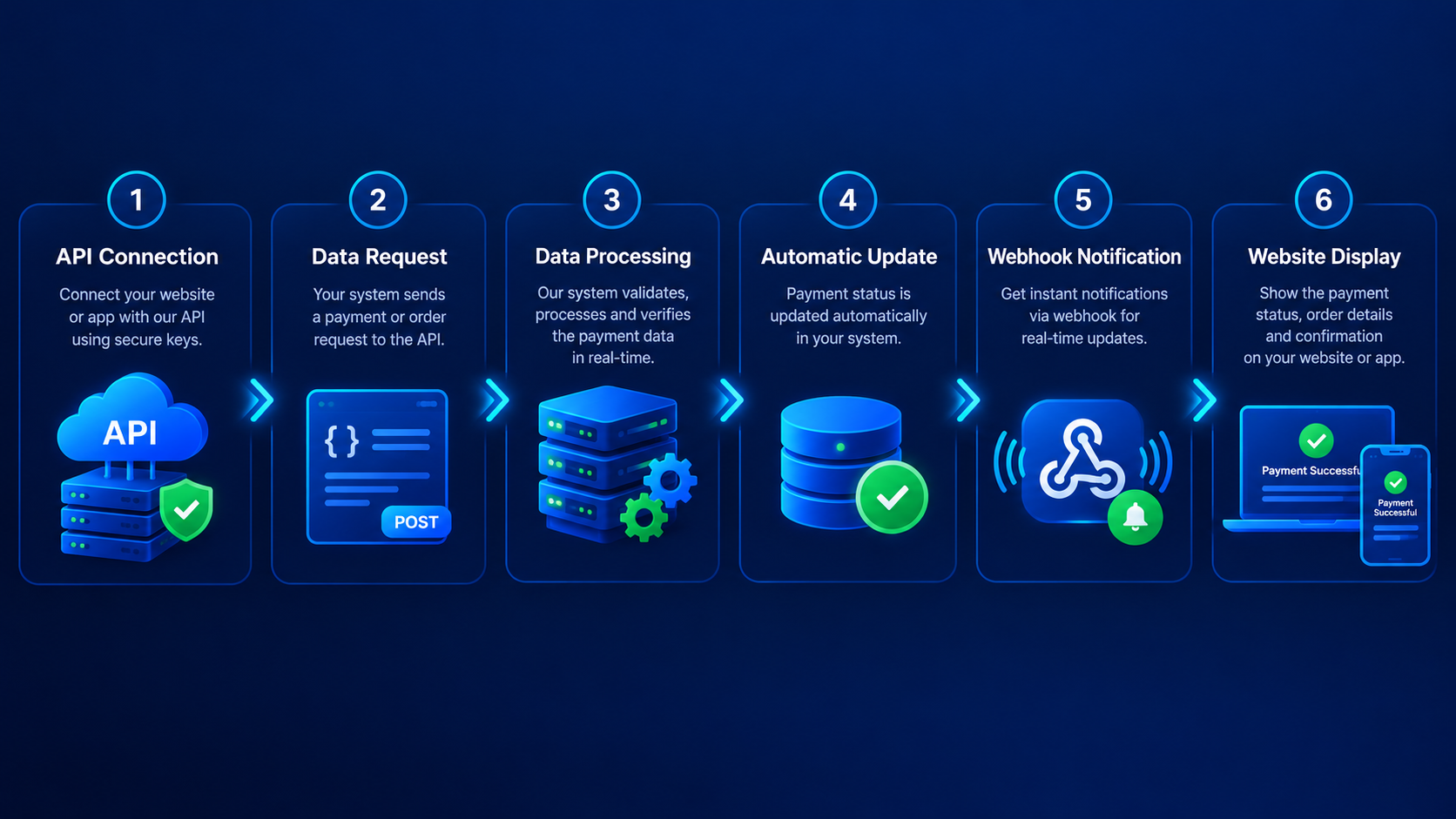
A typical API workflow follows these steps:
1. API Connection
The developer connects the application to the provider's API endpoint using the credentials and configuration described in the documentation.
2. Data Request
The application sends a request to retrieve the required information. This may involve a particular category, market, date, or other supported parameter.
3. Data Processing
The API returns a response in a structured format, commonly JSON. The application reads the response and processes the relevant fields.
4. Automatic Update
The application can save the returned data in its database and display it in the appropriate section of the website or software.
5. Webhook Notification
If the provider supports webhooks, it can send a notification to a configured endpoint when a relevant event or update occurs. This can reduce the need for repeated polling requests.
The overall process depends on the provider's architecture, data source, and update mechanism. A well-designed integration should also handle errors, duplicate events, timeouts, and temporary service interruptions.
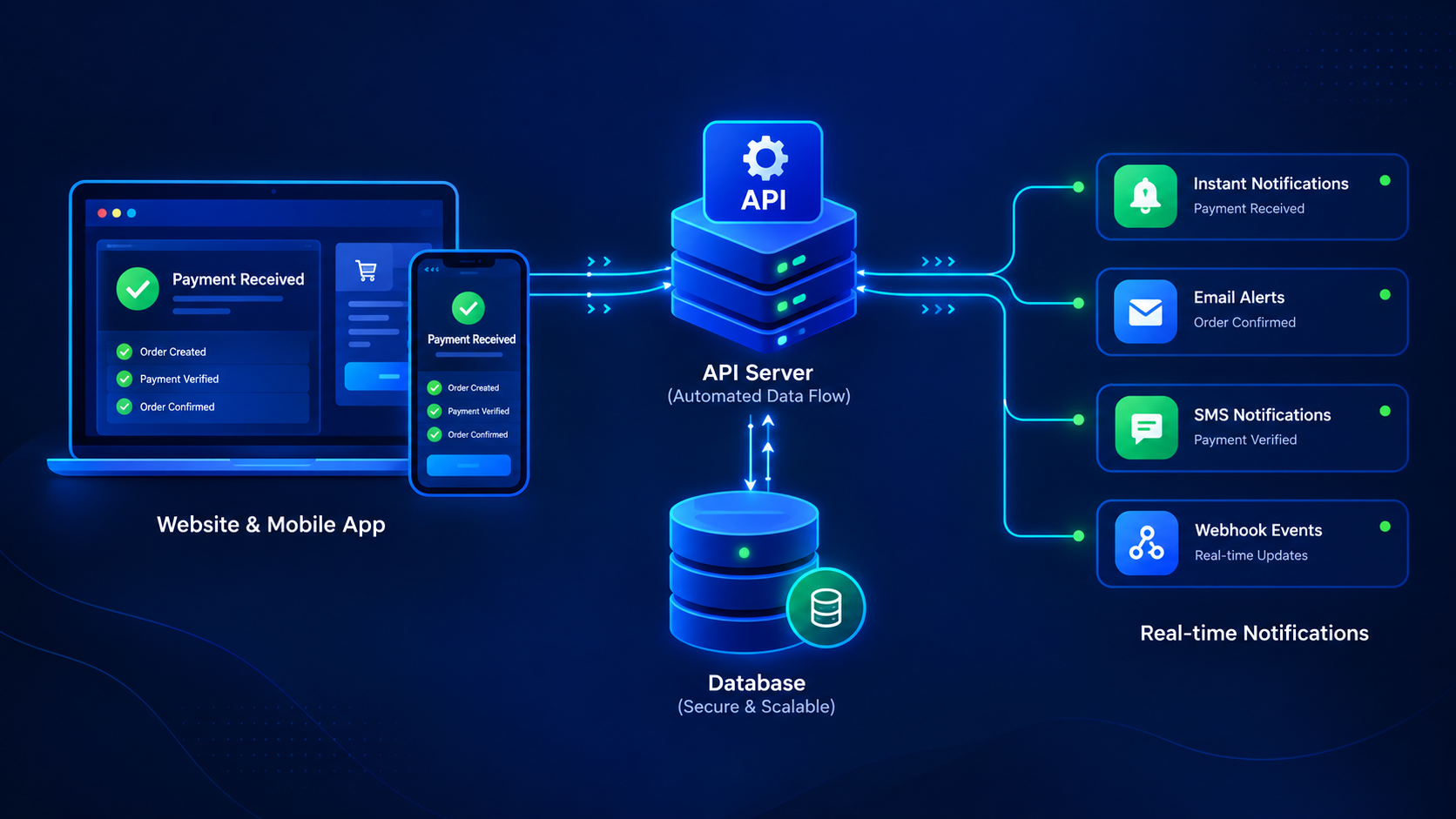
Auto Result API for Websites and Applications
An Auto Result API can be useful whenever an application needs to retrieve and display changing information from an external source. It helps developers separate the data delivery process from the user interface, making the software easier to maintain.
For example, a developer can build an application that receives structured information from an authorized provider and presents it in a dashboard or another suitable interface.
Common integration environments include:
Web applications: Developers can connect an API to a backend service that retrieves and processes external data.
Mobile applications: An app can request information from its backend and display the latest available data to users.
Admin dashboards: API responses can help populate tables, status indicators, and monitoring panels.
Custom software: Businesses can connect external data sources with their existing database and application workflows.
For security reasons, API credentials should generally be stored on the server rather than exposed in publicly accessible frontend code. Developers should also validate incoming data before using it in their applications.
Real-Time Updates and Fast Data Delivery
Speed is an important consideration when selecting an Auto Result API. However, the term "real-time" can mean different things depending on how the provider receives, verifies, processes, and distributes information.
Some APIs return data immediately after receiving a request. Others rely on scheduled updates or notifications from an upstream source.
Before choosing a provider, developers should examine:
- The documented update frequency
- Average response time and latency
- Data-source update delays
- Service availability and uptime history
- Error rates and rate limits
- The provider's monitoring and incident response process
A fast API response does not automatically mean that the underlying data is the most recent or independently verified. Both data freshness and response speed matter when evaluating an API service.
Why Are Webhooks Important in an Auto Result API?
Webhooks provide a convenient way for one system to notify another system when a supported event occurs.
Without webhooks, an application may need to call an API repeatedly to check whether new data is available. This approach is often called polling. Depending on the frequency of requests, polling can create unnecessary network traffic and increase API usage.
With a webhook-based workflow, the provider sends an HTTP request to a configured endpoint when a relevant event occurs.
The benefits can include:
- Fewer unnecessary polling requests
- Faster notification when an update is published
- More efficient backend processing
- Better integration with event-driven software
- Easier automation of supported workflows
A reliable webhook implementation should verify the sender where supported, validate the payload, handle duplicate notifications, and acknowledge requests appropriately. Retry policies and event logs are also useful for diagnosing missed or delayed notifications.
Webhook support is not identical across all providers, so developers should check the available event types and delivery guarantees in the documentation.
Key Features to Look for in an Auto Result API Provider
Choosing an API provider requires more than comparing prices. The service should meet the technical requirements of your application and offer clear information about its data sources, reliability, and usage conditions.
1. Clear API Documentation
Good documentation explains authentication, endpoints, request parameters, response formats, error codes, rate limits, and integration examples. Clear documentation makes it easier for developers to connect the API without unnecessary trial and error.
2. Consistent Data Delivery
Check how frequently the provider updates its data and how it handles delayed or unavailable information. Ask whether timestamps, source information, and verification status are included where appropriate.
3. Webhook Support
Webhook functionality can simplify event-driven integrations. Review the provider's supported events, retry behavior, authentication options, and delivery logs.
4. Secure API Access
A reliable API service should provide suitable access controls and protect credentials and transmitted information. HTTPS, key rotation, request validation, and access monitoring are useful security considerations.
5. High Availability
Service availability affects the reliability of applications that depend on external data. Review published uptime information, maintenance policies, incident communication, and any applicable service-level agreement.
6. Integration Assistance
Responsive technical support can help developers understand endpoints, diagnose errors, and complete integration more efficiently.
Compare request limits, usage allowances, setup fees, webhook availability, support levels, and additional charges. A low initial price may not represent the best overall value if important capabilities are restricted.
Auto Result API Integration: What Developers Should Know
Before starting an integration, developers should review the provider's technical requirements and test the service in a development environment.
A practical integration process generally includes the following steps:
- Read the official API documentation.
- Obtain authorized API credentials.
- Configure the required endpoint and request parameters.
- Test successful responses and common error conditions.
- Validate and store returned data safely.
- Configure webhooks if the provider supports them.
- Add logging, retries, and monitoring.
- Test the application before deploying it to production.
For example, an API may return a JSON object containing a record identifier, a value, a timestamp, and a status field. The application can validate those fields and use them according to the documented response format.
Developers should not assume that every provider uses the same endpoint names, response structure, authentication method, or webhook format. Always use the current documentation supplied by the actual provider.
How to Evaluate API Accuracy and Authenticity
Data accuracy is one of the most important factors when selecting an automated data service. An API can return a response quickly, but its usefulness depends on the quality and origin of the information it delivers.
Before relying on a provider, consider these checks:
- Identify the original source of the data.
- Ask how the information is checked before publication.
- Review timestamps and update histories.
- Compare sample responses with an authorized reference source.
- Understand how corrections and conflicting records are handled.
- Confirm whether the provider explains the limitations of its data.
Claims such as "100% accurate," "instant," or "fastest in the market" should be supported by measurable evidence. A transparent provider should explain its verification process and avoid promising performance that it cannot consistently demonstrate.
Common Challenges During Auto Result API Integration
Even a well-documented API can require careful implementation. Some common issues include authentication errors, request limits, network failures, outdated responses, and unexpected changes in response formats.
Developers can reduce these problems by following a few good practices.
Use proper error handling: Check HTTP status codes and handle failed requests gracefully.
Monitor API performance: Track response times, failures, and update delays to identify issues early.
Prevent duplicate processing: Use event identifiers or other documented mechanisms to avoid processing the same update more than once.
Protect sensitive credentials: Keep API keys out of public repositories, browser code, and application logs.
Plan for temporary outages: Where appropriate, use controlled retries, sensible timeouts, and clear fallback behavior.
Keep records of updates: Timestamps and audit logs can help developers investigate discrepancies and understand when data was received.
These practices help make API integrations more maintainable and resilient over time.
How to Choose the Right Auto Result API
The right provider depends on your application's purpose, technical requirements, budget, and expected request volume.
Start by defining what data your application needs and how frequently it must be updated. Then compare providers using the same criteria, including response times, update frequency, documentation quality, webhook functionality, security, support, and pricing.
It is also important to check whether the provider is authorized to distribute the relevant data and whether your intended use complies with applicable laws and platform requirements.
If possible, test a sample integration before committing to a long-term plan. A small proof of concept can reveal documentation gaps, latency issues, and compatibility problems that may not be obvious from a feature list.
Conclusion
An Auto Result API can help developers automate data retrieval, reduce repetitive manual work, and connect external data sources with websites, mobile applications, and backend software.
The most useful solution is not necessarily the one that makes the biggest speed claims. It is the one that delivers appropriately sourced data, provides clear documentation, supports secure integration, and offers dependable service.
By evaluating data quality, update frequency, webhook support, API security, availability, and technical assistance, developers can make a more informed decision and build an integration that is easier to maintain.
Before using any API in a production environment, verify its documentation, test its responses, and ensure that the intended use is authorized and compliant with applicable requirements.
Frequently Asked Questions About Auto Result API
1. What is an Auto Result API?
An Auto Result API is a software interface that allows applications to retrieve and process result-related data automatically from a supported source.
2. How does an Auto Result API work?
The application sends a request to an API endpoint, receives a structured response, and processes the returned information. Some providers also support webhooks for event-based notifications.
3. Can an Auto Result API be integrated into a website?
Yes. If the API supports your intended use, developers can integrate it through a backend application and display validated information on a website.